Selected Projects / Student Onboarding
Student Onboarding
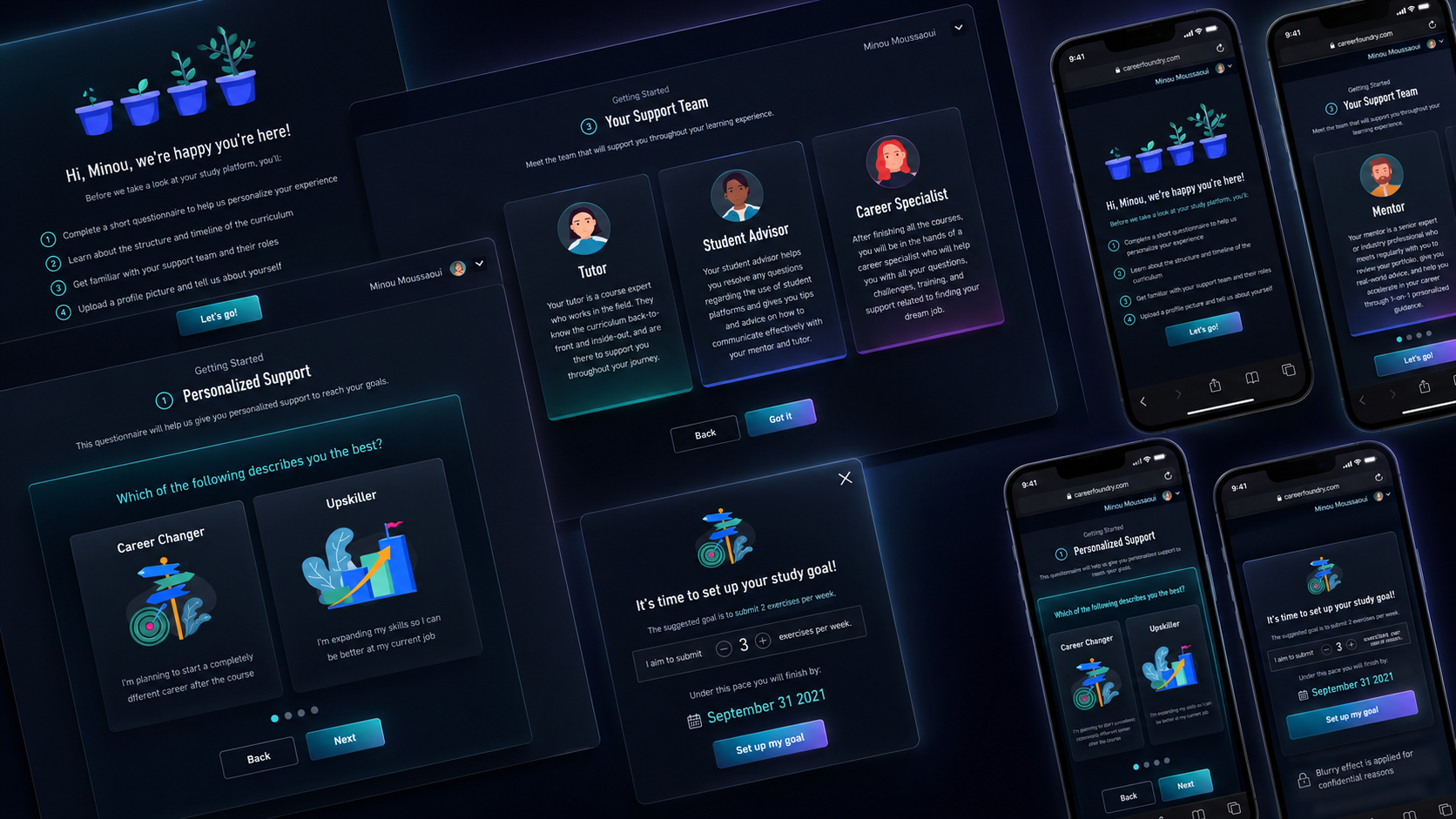
Redesigning the student onboarding experience
ROLE
Product Designer
TIMELINE
July – September 2023
CONTRIBUTIONS
Product strategy, user research, journey mapping, workshop facilitation, UX/UI design, prototyping, usability testing
OUTCOME
Increased one-month student retention by 2%
Summary
Starting an online learning program can feel overwhelming. New students need to understand the platform, prepare unfamiliar tools, manage their time, and build a sustainable study routine, often before completing their first lesson. I led the end-to-end design of a new onboarding experience that introduced essential information at the right moment, adapted to students' backgrounds and goals, and helped them take meaningful first steps toward completing their course.
PROJECT OVERVIEW
The challenges
At CareerFoundry, onboarding guidance was available, but much of it was presented as a long, information-heavy document outside the core learning experience. Students frequently skipped it, forgot important details, or struggled to turn the guidance into action. CareerFoundry students come from very different professional and educational backgrounds. Some already understand the subject and the tools required, while others are changing careers and encountering the field for the first time. Despite these differences, every student received largely the same onboarding guidance. The existing material contained useful information, but it required students to read and act on a long list of recommendations before beginning their course. Only 13.2% of surveyed students said they completed all the suggested onboarding activities.
- Important information was separated from the moment students needed it.
- Students found it difficult to remember and apply all the guidance.
- Beginners underestimated the time required to learn unfamiliar tools.
- Students working full-time struggled to create realistic study plans.
- The experience did not account for different goals, backgrounds, or levels of confidence.
The opportunity was not simply to explain the platform more clearly. We needed to help students move from uncertainty to meaningful action as quickly as possible.
Project goals
We defined the goal of onboarding as helping students reach their first meaningful value moment sooner. By the end of the experience, students should:
- Understand how the study platform supports their learning.
- Know what to expect from the program.
- Be prepared with the tools and information needed to begin.
- Establish a realistic and measurable study goal.
- Feel confident taking their first step independently.
- Know where to find support when they need it.
As a new student, I want to complete a goal-oriented onboarding experience that helps me understand the platform, prepare for my course, and confidently begin learning.
Initial hypotheses
Together with the Product Owner, I defined three hypotheses to guide our research. 1. Learning by doing would communicate value more effectively. Rather than telling students what the platform could do, we believed that guiding them through essential actions would help them experience its value directly. 2. Early goal-setting would support stronger study habits. We believed that encouraging students to define a study goal during onboarding would help them establish a routine and remain on track. 3. Understanding each student would enable better support. We believed that collecting information about students' backgrounds, motivations, and availability would allow the product to offer more relevant guidance and resources.
DISCOVERY
Surveying 212 students
To understand students' expectations and validate our assumptions, we launched an onboarding survey and received 212 responses across different student profiles. The research revealed a clear gap between the information students wanted and the way it was currently delivered.
Key findings
- 44% wanted a short, step-by-step platform tour, embedded directly within the product rather than provided as a separate document.
- 55.6% wanted a clear overview of the program timeline and important dates — understanding course structure was one of the most important factors in feeling prepared.
- 44% wanted clearer information about required tools and software, particularly beginners.
- Only 13.2% completed all recommended onboarding activities: the guidance asked students to process too much before they had context.
- More than half considered a study routine and goal important to completing the course, but many needed help turning intention into a practical routine.
Below are some most common questions from our students during their onboarding period.
Going deeper through interviews
I invited six students from different courses and backgrounds to participate in interviews. The interviews helped explain why students were struggling: 1. Too much information arrived at once. Students found the onboarding guide comprehensive but difficult to absorb. Even when they read it, they often forgot the information before needing to apply it. 2. Beginners needed more preparation support. Students without prior industry experience spent considerably more time learning unfamiliar software and tools. 3. Time-based planning felt unreliable. Students working alongside their course struggled to estimate how many hours a task would take. Course difficulty varied, making fixed schedules difficult to maintain. 4. Students wanted onboarding to feel relevant. They expected guidance that reflected their experience, goals, and availability rather than a generic sequence designed for everyone.
Turning research into design principles
- Make it actionable — every onboarding step should help students complete a meaningful action rather than simply consume information.
- Provide guidance in context — information should appear when it becomes relevant, not weeks before a student needs it.
- Respect students' urgency — most students sign in because they want to begin learning. Onboarding should accelerate that goal rather than become another barrier.
- Adapt to different starting points — a career changer with no previous experience needs different preparation from someone already working in the field.
IDEATION
Product opportunities mapping
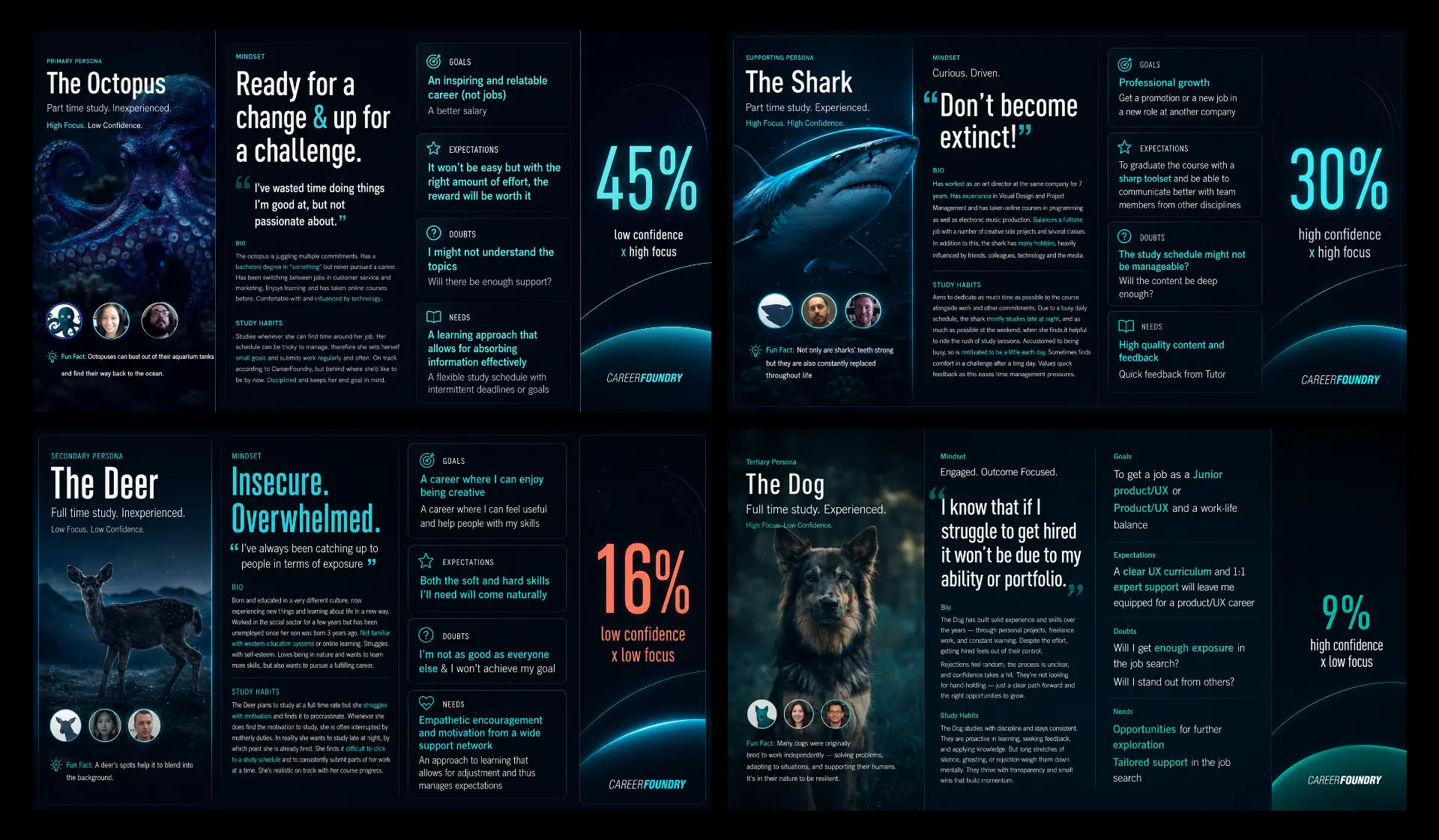
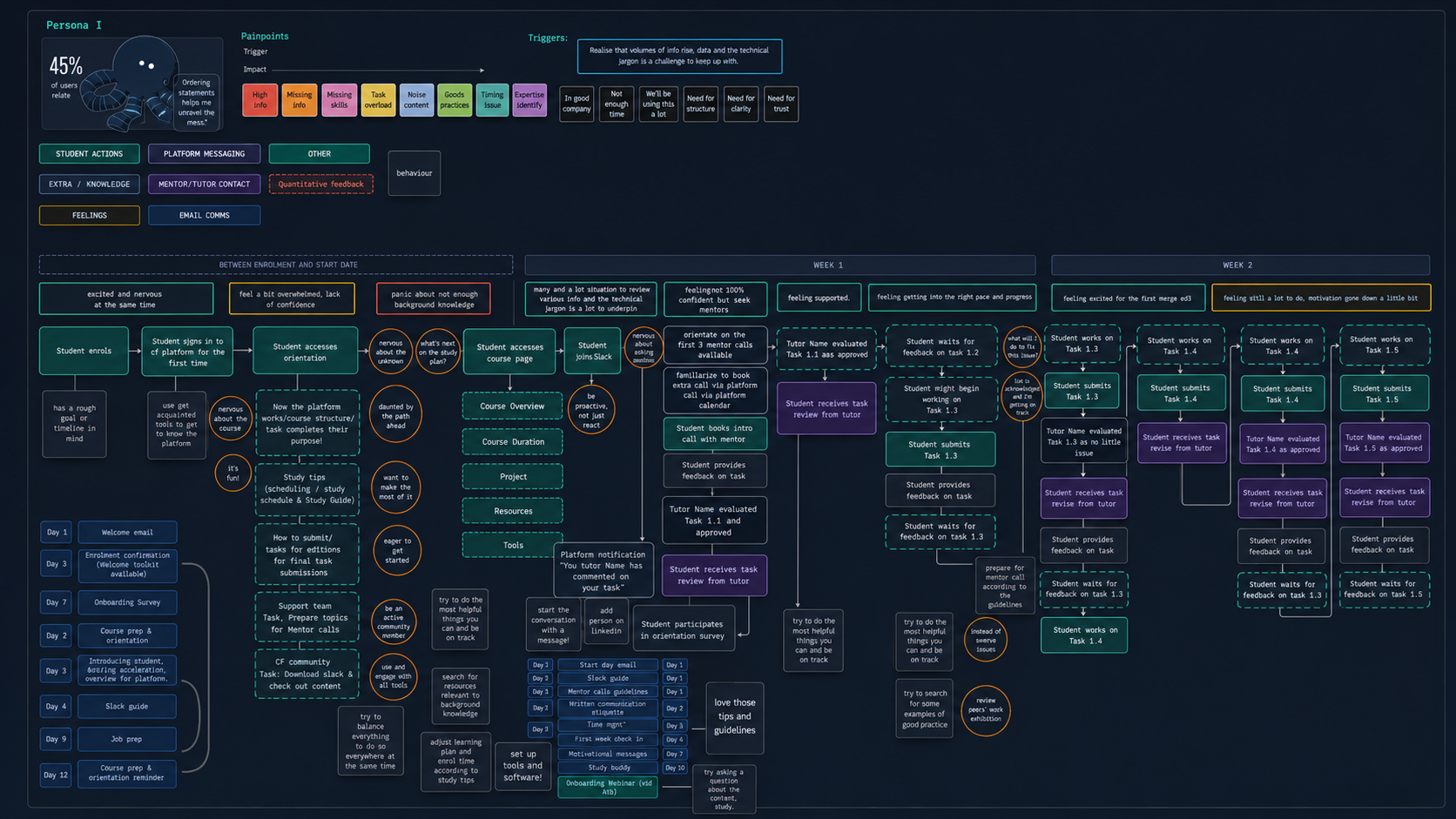
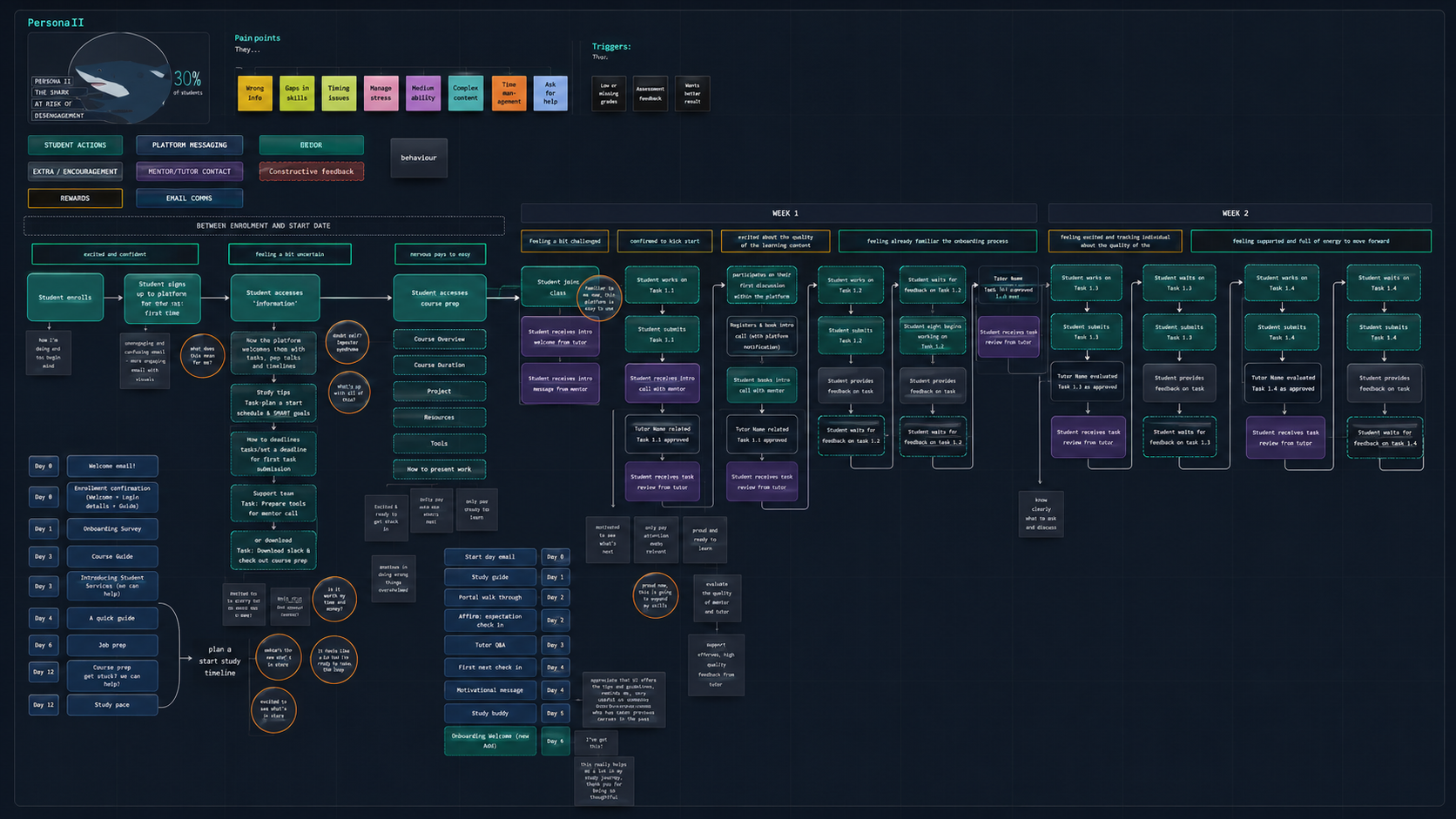
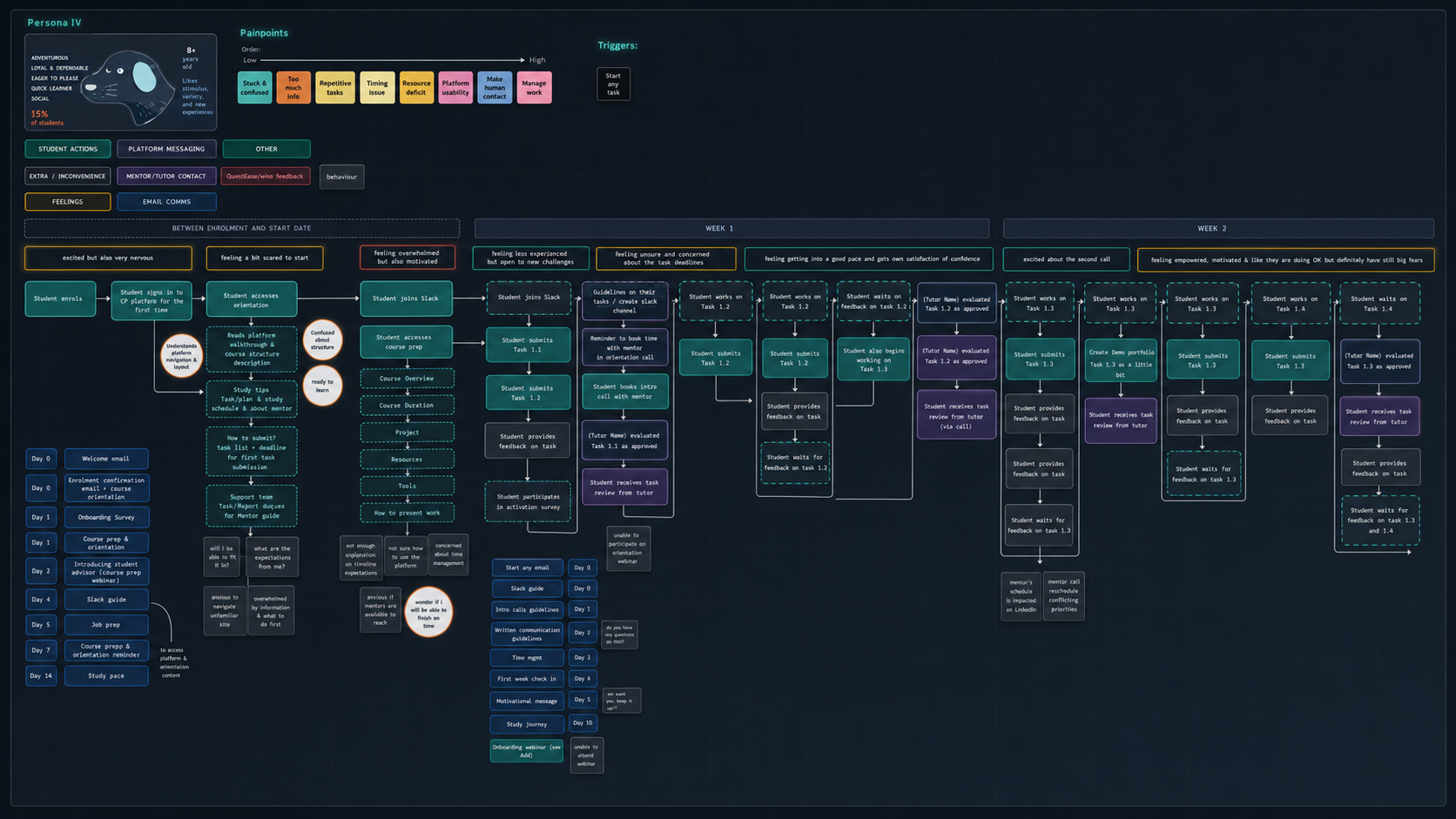
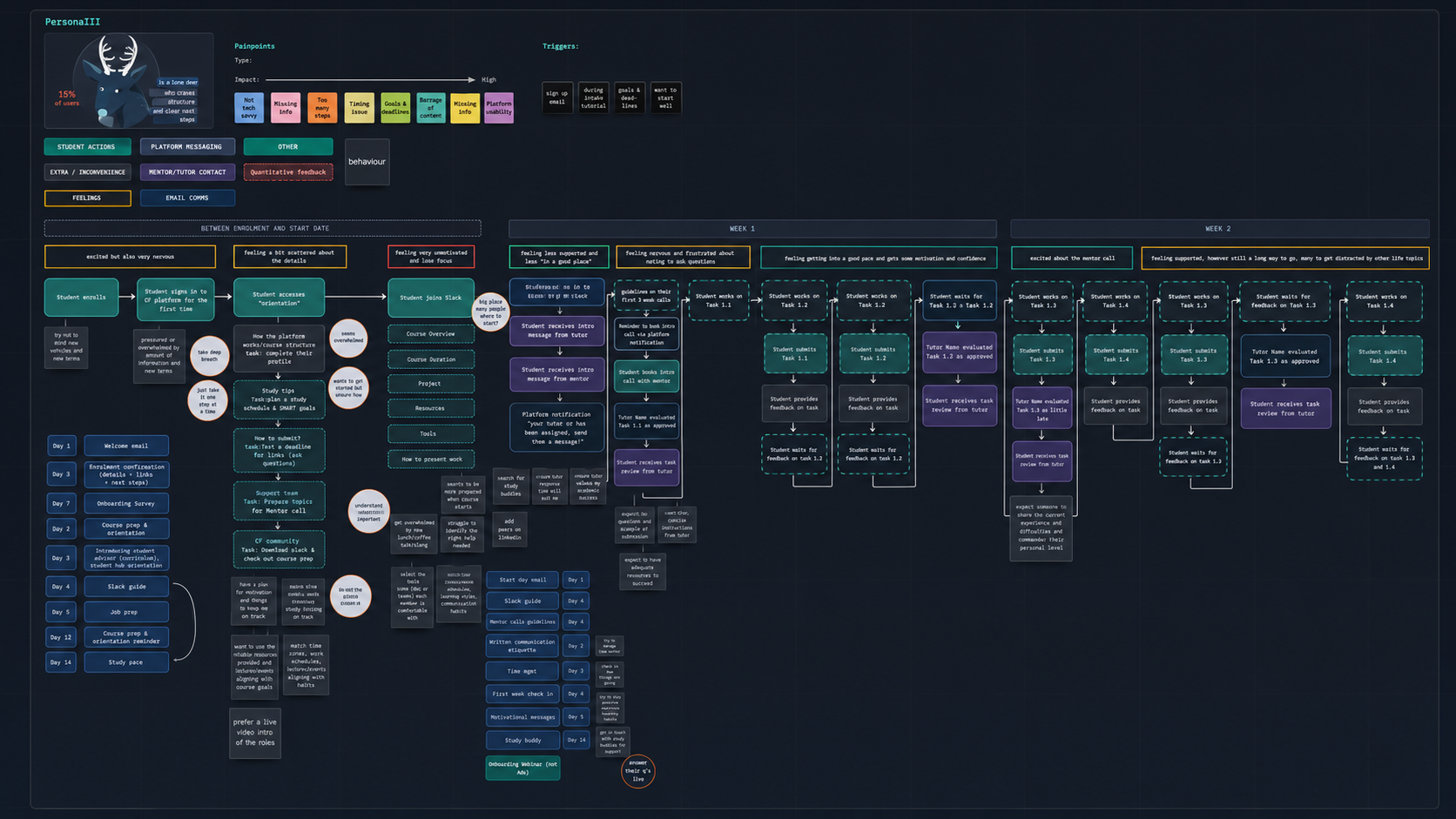
CareerFoundry had identified four broad student personas based on factors such as previous experience, motivation, available study time, and confidence. I mapped the onboarding journey for each persona, including key actions, questions and concerns, emotional highs and lows, product touchpoints, support needs, and potential intervention points. I facilitated an ideation workshop with the Product Owner, engineers, and content stakeholders. The workshop was structured around the student journeys: team members identified opportunities at each stage and contributed ideas based on their area of expertise. Then I ran a Crazy Eight brainstorming session with the team, so everyone had the opportunity to sketch their ideal solutions. Here are the 3 How Might We questions that I defined to open our creative thinking.
- How might we introduce the platform without overwhelming new students?
- How might we use students' backgrounds and goals to create a more relevant experience?
- How might we help students prepare the tools and software they need?
At the end of the ideation workshop, we came up with 3 concrete product ideas:
1. A personalized onboarding survey
The experience begins with a short survey that asks students about previous knowledge and professional experience, motivation for taking the course, weekly availability, confidence level, and learning goals. The information could be used to tailor resources, set more realistic expectations, and provide better support throughout the course. The survey was intentionally concise — its role was not to create an extensive student profile, but to collect enough context to make the next steps more relevant.
2. A contextual platform walkthrough
Instead of asking students to read a long onboarding document, the platform introduces essential features through short coach marks.
- Focuses on one useful action.
- Appears within the relevant interface.
- Uses concise, actionable language.
- Allows students to move forward or skip.
- Can be accessed again later.
The walkthrough helps students become familiar with the platform while actively using it. This reduces the gap between receiving information and applying it.
3. A measurable study goal
The onboarding flow also helps students establish an initial study goal. Our first concept allowed students to plan specific study time slots. Research later showed that students found this difficult because the time needed to complete an exercise could vary considerably. We therefore reframed the goal around weekly exercise submissions — easier to understand, more closely connected to course progress, less dependent on uncertain time estimates, and easier to monitor and adjust. In order to achieve the points mentioned above, we will need a lot of support from the curriculum editors from the Education team to provide support on breaking down the content of the onboarding guideline, as well as provide content for the tools and software section.
PROTOTYPING & TESTING
From wireframe to usability test
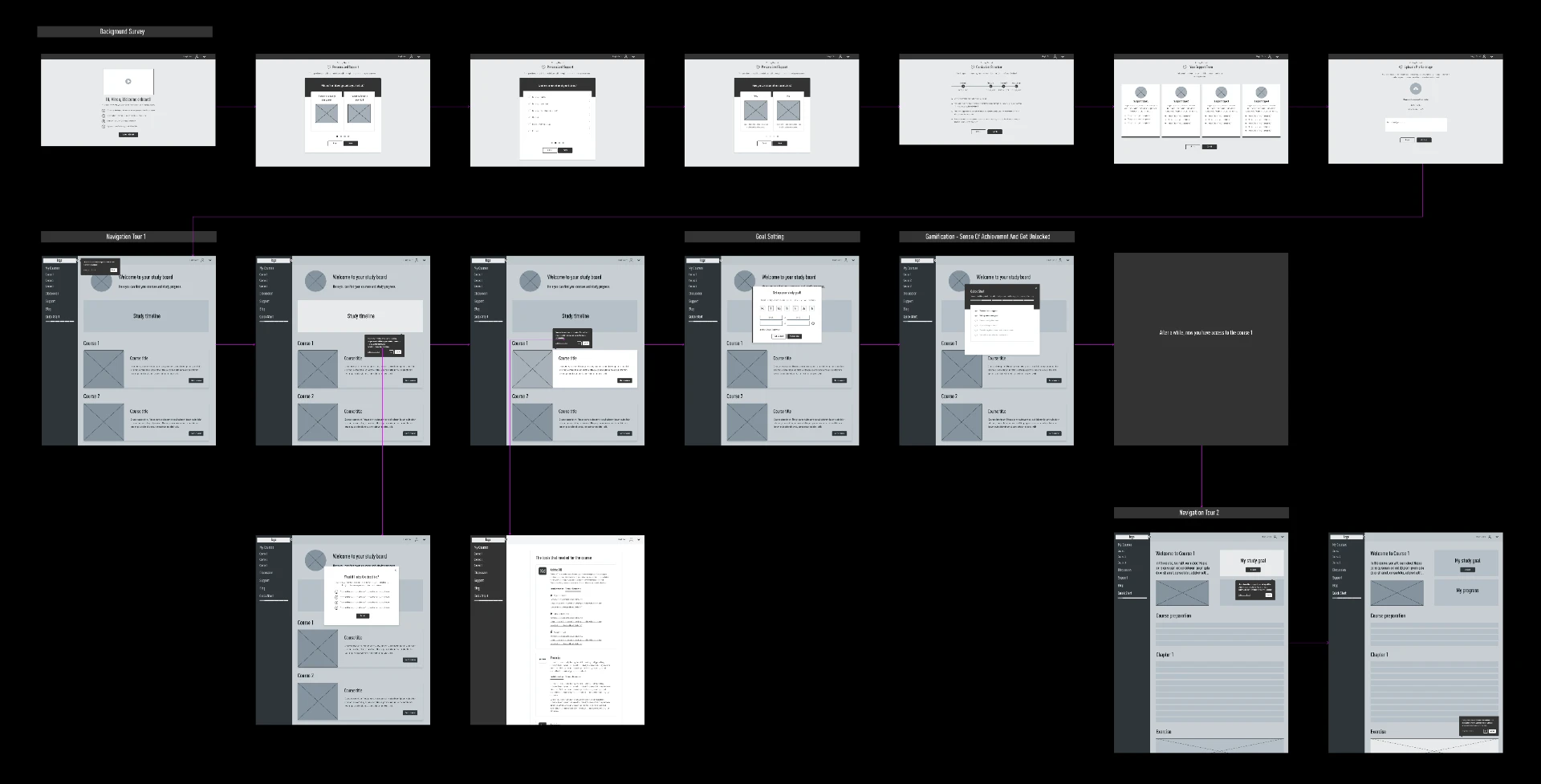
Based on the workshop outcomes, I created a wireframe connecting the parts of the experience: a welcoming introduction, a short onboarding survey, an interactive platform walkthrough, tool and software preparation, a weekly study-goal setup, and a clear transition into the course. I used progressive disclosure to keep each step focused — students would only see the information needed to make the current decision or complete the current action. The prototype was then developed into an interactive flow for usability testing with six recently enrolled students from different courses and profiles.
- Utility — did the experience address students' most important onboarding needs?
- Learnability — could students understand the walkthrough and navigation without explanation?
- Efficiency — could they find the information and complete the actions quickly?
- Effectiveness — did they remain engaged throughout the flow, or did they attempt to skip it?
- Satisfaction — did the experience help them feel welcomed, prepared, and confident?
What we learned
1. Personalization created a positive first impression. Students understood how their answers could lead to more relevant support — but the value exchange needed to be clear. 2. Students valued guidance, but wanted to start quickly. The walkthrough felt familiar and useful, yet students had little patience for unnecessary steps. Onboarding should remove uncertainty without delaying the primary task. 3. The progress tracker increased complexity. Students found the side progress bar and gamified elements more confusing than helpful, so we removed both. 4. Some features did not require explanation. Several coach marks described functionality participants already understood. We retained only those connected to important or unfamiliar actions. 5. Additional links competed with the core flow. None of the participants opened the embedded links, so we removed them and made the walkthrough easy to restart later. 6. The welcome video was frequently skipped. Only one of six participants played it. We replaced it with a lightweight illustration and concise welcome message. 6. Outcome-based goals were more useful than time-based goals. Participants preferred committing to weekly exercise submissions rather than fixed study hours.
ITERATION
Simplifying the experience
- Removed the progress tracker and gamification — onboarding became a focused sequence rather than a separate task to “win.”
- Reduced the number of coach marks — we only retained guidance for actions that were important, unfamiliar, or easy to overlook.
- Removed secondary links from the walkthrough — each coach mark focused on a single message and action.
- Replaced the welcome video with an illustration — an inviting opening without slowing students down.
- Changed study goals from hours to exercise submissions — more concrete, measurable, and tied to academic progress.
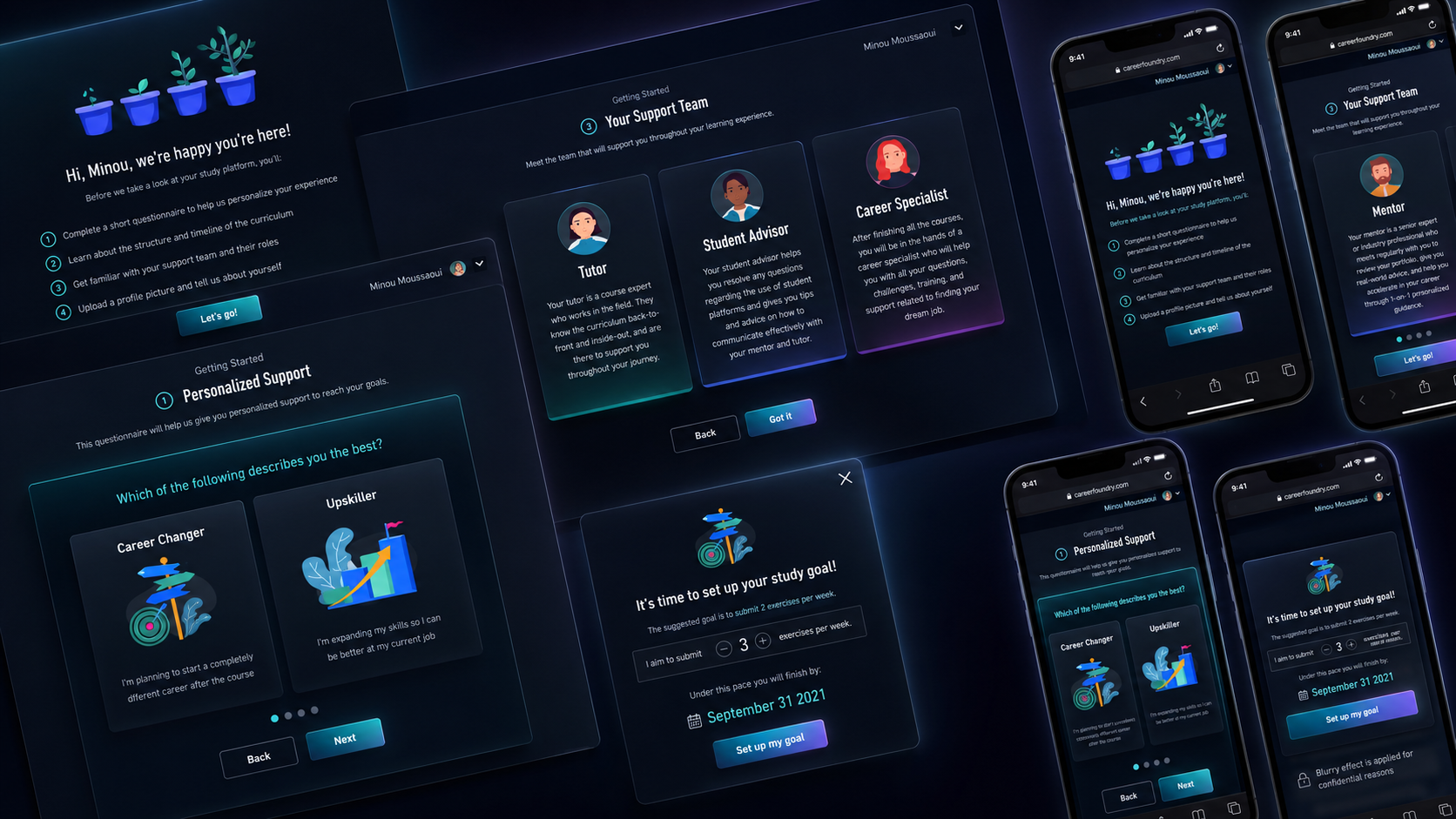
These changes made the onboarding shorter and reduced the amount of information students had to process before beginning their course.
OUTCOME
Measuring success
We defined a set of behavioral and experience metrics to evaluate the released experience. The primary outcome was to increase one-month student retention by 2%.
- At least 40% of students complete three of the five key walkthrough actions.
- At least 60% complete a meaningful part of their profile, such as adding a photo or biography.
- Students begin interacting with the learning platform earlier.
- Students' self-reported preparedness for their first submission increases by 30%.
- Support questions related to platform navigation and course preparation decrease.
- Retention before the official course start remains stable, ensuring no additional early drop-off.
The project transformed onboarding from a passive collection of instructions into a focused product experience. Rather than explaining everything at once, the redesigned flow helped students understand the platform through direct interaction, receive essential information in context, prepare the tools needed for their course, set a practical and measurable study goal, and begin learning with greater clarity and confidence. Just as importantly, the process aligned product, engineering, curriculum, content, and analytics around a shared definition of successful student onboarding.
REFLECTIONS
Key takeaways
1. Clarity from the start. Students need a short, structured onboarding flow that clearly explains what to expect — program timeline, tools required, and first steps — so they can feel prepared and confident before the course begins. 2. Actionable guidance, not just information. Simple checklists, step-by-step tours, and easy access to software/tools help students take action quickly rather than getting lost in instructions. 3. Personalization matters. Understanding students’ backgrounds, goals, and experience levels enables the platform to recommend the right resources and set realistic expectations early on. 4. Early confidence-building. Quick wins, like completing initial tasks or installing tools successfully, make students feel capable and reduce anxiety about starting the course. 5. Ongoing support and connection. Built-in ways to reach tutors, peers, or FAQs encourage students to ask for help and stay engaged when challenges arise.
Disciplines
- Product strategy
- user research
- journey mapping
- workshop facilitation
- UX/UI design
- prototyping
- usability testing
Next project
Inu Health →